
A few days ago, on a call with a group of investors, a colleague asked: “Are there best practices for designing your data architecture to be AI-ready?”
Everyone had opinions. Connect AI to your CRM. Use vector databases. Try this new SaaS tool. I did something different: I moved everything to Markdown files in folders. Not just my deal flow — everything. Investments, businesses I’m building, legal matters, travel planning, property management, health protocols. My entire personal and professional life, structured so that any AI tool can read it.
Thanks for reading! Subscribe for free to receive new posts and support my work.
That sounds absurd. Let me explain why it’s not.
The Mess We All Have
You know the feeling. Work stuff in Notion, documents in Google Drive, notes in Apple Notes or Obsidian, tasks in Asana or Monday, finances in a spreadsheet, emails scattered everywhere. When you want AI to actually help with any of this, you hit a wall. Upload files one at a time? Pay per API call? Build a custom integration? Set up MCP integrations? (WTF is MCP??, you might ask, and you are not alone...)
The problem isn’t the AI. It’s the data architecture. Your information is locked inside tools that were designed for humans to click through and connect, not for AI to read and process.
The Simplest Architecture That Works
Here’s what I did: I created a folder structure on my local drive, synced via Google Drive, organized by life themes — each containing projects with the same set of Markdown files.
my-system/
├── invest/    # deals, portfolio
├── build/     # ventures, products
├── work/      # Consulting
├── play/      # Travel, hobbies
├── live/      # Health, family
├── property/  # Real estate
├── legal/     # Taxes, entities
└── _system/   # Dashboard
Each project within any theme gets the same scaffold by default:
project-x/
├── CLAUDE.md        # Briefing
├── overview.md      # Context
├── workstreams.md   # Active work
├── _session-log.md  # AI log
├── _learning/       # Lessons
├── inputs/          # Working files
├── reference/       # Deep context
├── bot-work/        # Bot intel
└── vault/           # Sensitive
That’s it. Same structure whether it’s an investment deal, a property sale, a consulting engagement, or a scuba diving certification. The project type changes; the architecture doesn’t.
This is the scaffold that works for me — but there’s no single right answer. You might prefer chronological notes folders, a docs/active/archive split, or a flat structure with just a README and an AI rules file. The important thing is consistency: pick a structure, apply it to every project, and let the AI learn the pattern. You can always evolve it later. I even built a custom command that scaffolds new projects automatically — same structure every time, zero friction.
Why Markdown? Because every AI tool — Claude, GPT, Gemini, local models, whatever comes next — can read Markdown natively. No API. No connector. No MCP server. No vendor lock-in. The files are on my machine. I own them.
“But I’ll miss my dashboard / CRM view...” You don’t have to give it up. Claude Code can build a local web app — a deal tracker, a project dashboard, whatever you need — that reads directly from your Markdown files. Show it a few screenshots of your current Notion board or spreadsheet, and it generates the equivalent in an afternoon. No SaaS, no cloud, no subscription. The data stays in files; you just get a visual layer on top. If you need more structure, use .json files for tracking — AI tools read JSON natively, and Claude Code can set up any view you need on top of them.
The File That Changes Everything
The most important file is CLAUDE.md. It’s a briefing document that tells any AI: what this project is, what my role in it is, what files exist, and how to think about it.
But here’s the subtle part: it also defines a personality. A due diligence project’s CLAUDE.md might say: “Be skeptical. Flag inconsistencies aggressively.” A wellness project’s might say: “Be supportive and practical. Focus on sustainable habits.” A legal matter’s might say: “Be precise. Cite specific regulations. Challenge assumptions.” The same AI model, pointed at different folders, thinks differently.
Ten minutes writing a good CLAUDE.md saves hours of re-explaining context across sessions.
Institutional Memory That Actually Works
Each project has a _learning/ folder with three files: lessons.md, decisions.md, errors.md.
Here’s the key: every AI session checks errors.md before starting work. The system avoids past mistakes automatically. decisions.md captures not just what was decided, but why — the reasoning, the alternatives, the constraints. When a similar situation comes up months later, the context is preserved.
This works across every domain. “We chose this contractor because X, but they were late on Y — next time, ask about Z upfront.” “I passed on this deal because the unit economics didn’t hold, but if they had 3x the margin, it would change the thesis.” “The renovation went over budget because we didn’t get competing bids — next time, get three quotes minimum.”
The system literally gets smarter over time — not because the AI model improves, but because the accumulated context improves.
The Session Problem (Solved)
Most people use AI statelessly: ask a question, get an answer, start from zero next time. I solved this two ways:
Within a project: Every AI session appends to _session-log.md. Next session reads the last few entries. Instant context.
Across all projects: A session-state.md file gets rewritten at the end of each working session with: what’s in flight, recent decisions, known gotchas, and what needs attention next. Start a new session days later — even with a completely fresh AI instance — and it already knows where everything stands.
Moving Folders Is the Status Change
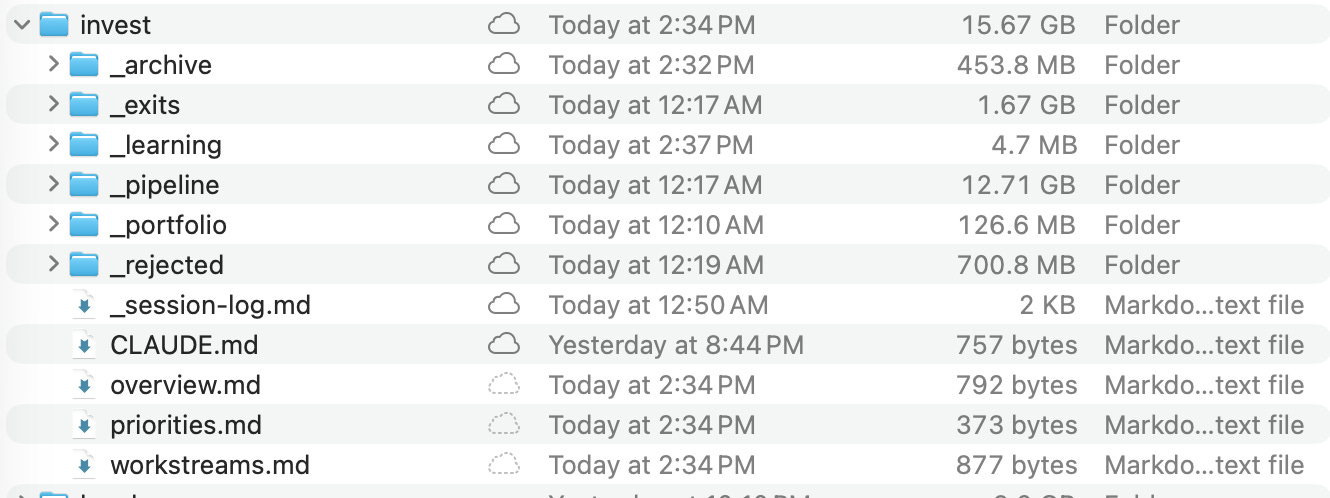
No CRM dropdowns. No tags. No status fields to update. A deal in _pipeline/ is being evaluated. When I invest, it moves to _portfolio/. Pass? Moves to _rejected/. Exit? Moves to _exits/. A legal matter in progress sits at the theme root; resolved, it moves to _resolved/.
The AI reads the file path and knows the lifecycle stage. And critically: _rejected/ and _resolved/ are preserved, not deleted. Those are learning data.
The Email Trick
One question that always comes up: “What about email?” I deliberately don’t connect AI to my inbox — the security surface is too large. Instead, when an email thread has genuinely useful context — a founder’s strategic response, a lawyer’s analysis, a contractor’s proposal — I save it as a PDF and drop it into the project’s vault/ or reference/ folder.
Thirty seconds of work. The AI can read it, cross-reference it with other project files, and incorporate it into analysis. But it only sees the conversations I’ve chosen to include — not every email I’ve ever received. High signal, zero risk.
The Bots: AI That Works When You Don’t
This is where it goes from “organized files” to “operating system.”
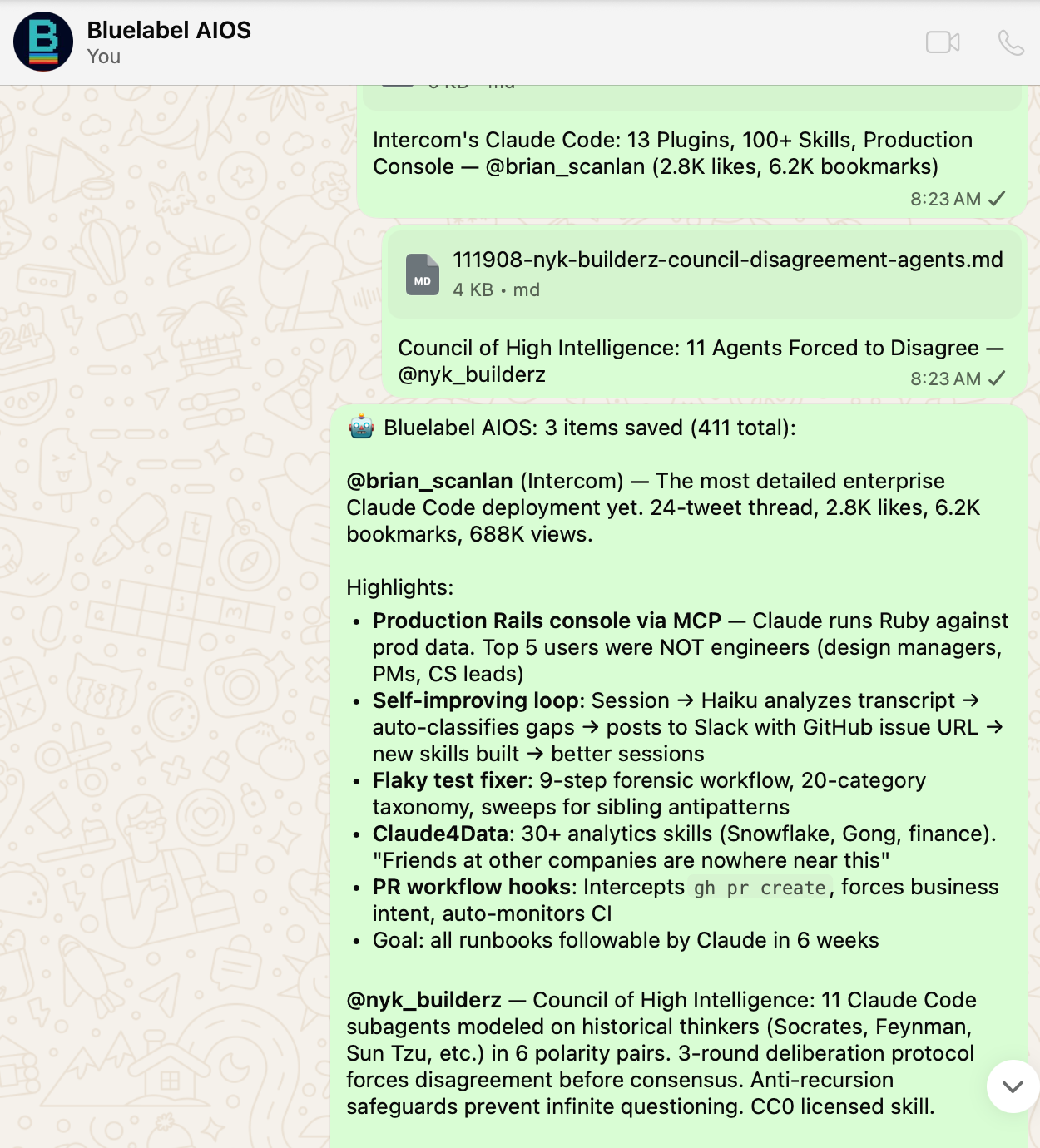
I run always-on AI agents on WhatsApp, tied to specific projects. They run 24/7 on a dedicated server. I talk to them from my phone — during calls, at dinner, on a plane. I built mine by forking an open-source project and customizing it, but there are multiple ways to set this up — each with different trade-offs in cost, complexity, and security. The specific implementation matters less than the architecture.
But bots are optional. Most of my projects don’t have one. I spin up a bot only when:
I need to interact with a project away from my laptop
The bot can accumulate intelligence autonomously over time
For deep work, I use Claude Code directly in the project folder. The bot is for mobility and continuous learning. The local session is for depth.
Multiple AI Tools, One Source of Truth
I don’t use just one AI tool. I regularly run sessions in ChatGPT, Gemini, or Grok to validate or challenge the analysis I build in Claude Code — especially for deep planning and important decisions. Getting a second opinion from a different model is like asking a colleague to poke holes in your thinking.
But here’s the discipline: my file system is always the single source of truth. When I finish a session in any external tool, I ask it to generate a summary — what was discussed, what we agreed on, key takeaways — as a Markdown file. I download it and save it into the project’s vault/, reference/, or _learning/ folder depending on the content. I never rely on ChatGPT’s memory or any other tool’s conversation history for continuity. My files are my system. Everything else builds on top of that.
Three Flavors of Bot
Project bots — Dedicated to one project. My investment DD bot knows only the deal I’m evaluating. My property sale bot only has the listing details and buyer negotiations. During a call with a founder: “The CEO just said ARR is $4M — does that match the data room?” The bot cross-references and replies in real time.
Theme bots — Bird’s-eye view across all projects in a theme. A pipeline bot sees every deal I’ve evaluated and passed on. Over months, it learns my patterns. An “invest” bot could flag: “This company’s profile looks similar to one you passed on — but this one has 3x the margin.” Pattern recognition that no CRM can replicate.
Infrastructure bots — System-level. A briefing bot that crawls sources and synthesizes daily intelligence. A general-purpose assistant. These serve the platform, not any single project.
The Intelligence Loop
Every bot belongs to a project. Three times a day, my laptop pulls the bot’s accumulated intelligence — research, analysis, knowledge bases, briefing summaries — into the project’s bot-work/ folder. Separately, my laptop pushes updated project context to the bot.
The loop:
I update project files during deep work sessions
Updated context syncs to the bot (3x daily)
Bot uses new context in its ongoing work
Bot’s intelligence syncs back to project folder (3x daily)
Next deep work session, bot intelligence is already there
When I sit down for a deep session on any project, I don’t start cold. The bot’s accumulated work is in bot-work/, structured and ready.
Security: Bots Get Packages, Not Access
The bots run on a separate machine. They cannot access my Google Drive. A manifest file explicitly lists which files each bot can see. Vault folders, stakeholder lists, personal data — excluded by default.
If the bot server is compromised, the attacker gets only the curated files I approved. The connection is one-directional: my laptop pushes to the server. The server cannot reach back.
How I Use This for Angel Investing
I’m a solo angel — no team, no analysts, no associates. Just me evaluating deals, doing DD, and monitoring a portfolio. This system is what makes that possible without drowning in spreadsheets.
My invest/ folder has four lifecycle stages: _pipeline/ (evaluating), _portfolio/ (active investments), _rejected/ and _exits/. Each deal gets the same scaffold. When a deck comes in, I create the project within the _pipeline/ folder, write the CLAUDE.md, drop the deck in inputs/, and start a Claude Code session. The AI reads the briefing and knows exactly what to do.
For active DD, I spin up a dedicated WhatsApp bot for the deal. I can interact with it during founder calls, from the airport, wherever. “The CEO just mentioned they lost their biggest client last quarter — does the revenue data reflect that?” The bot has the data room. It checks and responds in 30 seconds.
The _rejected/ folder is critical. Every passed deal stays in the system with full _learning/ notes on why I passed. Over time, this becomes a pattern library. When a new deal comes in, the AI can cross-reference against dozens of past evaluations: “You passed on two similar companies — both times because of customer concentration. This one has the same profile.”
The Bull and The Bear. For every serious deal, I set up two opposing modes: “The Bull” (make the strongest case for investing) and “The Bear” (find every reason to pass). I run both before I decide. The _learning/ folder captures both arguments and my final call. Over time, I can see patterns in my own decision-making that I’d never spot otherwise.
What I’d Build for a VC Fund
I used to work in venture capital, and left in part because the firm wasn’t eager to embrace AI. I was convinced that without AI tools, VC funds are operating with one hand tied behind their back. A year later, I’m even more convinced. If I were building this system for a multi-partner fund, I’d expand it in three ways:
1. Pipeline Bot (”The Screener”) — A theme-level bot that sees every deal in pipeline/ and _rejected/. Its job: pattern recognition across the firm’s entire decision history. “We’ve evaluated 12 developer tools in 3 years. The common thread in the passes was weak go-to-market — but this one has a VP Sales from a top enterprise company. Different profile.” This bot does pipeline hygiene too: “You haven’t touched this deal in 12 days — still active?”
2. Dedicated DD Bots per deal — Same as what I do now, but each partner has their own AI instances. Session logs are tagged by partner — instant audit trail of who analyzed what. When the deal goes to IC, all the accumulated intelligence is already structured in bot-work/.
3. Portfolio Bot (”The Board Advisor”) — Monitors all portfolio companies. Synthesizes board decks, tracks KPIs across the portfolio, spots cross-company patterns: “Three companies hiring for the same role — introduce them to the same recruiter?” Board prep becomes a conversation, not a scramble.
The _learning/ folders are shared across partners. When someone leaves the firm, their accumulated judgment doesn’t walk out the door — it’s in the files.
You get the gist...
The Real Prize: Proprietary Intelligence That Compounds
Everything above is useful at the individual level. But the real unlock — for a person or a company — happens when this becomes a long-term knowledge system. That’s when you stop having a productivity tool and start building a proprietary asset.
Here’s what I mean. Every decision you’ve ever made — why you invested, why you passed, why you hired that contractor, why you chose that vendor, why you picked that destination — contains embedded judgment. But where does it live? In your head. In email threads you’ll never find. In the memory of conversations you’ve already forgotten.
When that knowledge is structured in _learning/ folders and _rejected/ archives across every project you’ve ever worked on, it becomes queryable judgment. An AI can read across all of it and surface patterns you’d never see:
“The last three contractors you hired through referrals worked out. The last two from marketplaces didn’t. This new one is from a marketplace.”
“You’ve passed on three companies in this space. The underlying concern was always regulatory risk. Has the landscape changed?”
“Your best-performing investments all had one thing in common: the founder had failed once before in an adjacent market.”
No app captures this. No CRM stores it. It only exists if you deliberately record why — not just what — and structure it so that AI can reason across the full history.
The Compounding Effect
Phase 1: The system is a productivity tool. Sessions are faster, context carries over, bots save time.
Phase 2: The _learning/ folders start showing patterns. You begin to see your own biases and tendencies.
Phase 3+: You have a personal intelligence layer reflecting hundreds of decisions and years of accumulated judgment. It’s an asset that no one else has — it’s built from your specific experience, your reasoning, your mistakes.
For a company, multiply this by every employee. The firm’s collective judgment becomes queryable, preserved, and compounding. New hires onboard by reading the _learning/ folders. Institutional memory stops being tribal knowledge that walks out the door. The firm’s accumulated knowledge becomes its moat — in a world where moats are harder to find and sustain than ever.
This Works for Any Knowledge Business
The same principle applies anywhere decisions are the product: consulting firms, law practices, investment firms, PE shops, family offices, agencies. Any organization where experienced professionals make judgment calls based on pattern recognition — and where that judgment currently lives in people’s heads — can capture it in this structure.
The scaffold changes (a law firm’s project is a case, not a deal), but the architecture is identical. The competitive advantage comes from the same place: you’re turning tacit knowledge into a queryable, compounding asset.
What I’d Tell You to Do Monday Morning
Create one project folder with the scaffold. Pick your most active project — any domain. Create the structure. Write the CLAUDE.md. Move your working files into inputs/. Open Claude Code or ChatGPT and point it at the folder.
Add session continuity. After your first AI session, log what you did in
_session-log.md. Next session, tell the AI to read the log first. Notice the difference.Expand gradually. Add more projects. Create the dashboard.md. Start using _learning/ to capture decisions — not just what, but why.
Try the email trick. Next time someone sends you a substantive response, save it as PDF into the project folder. Watch how much richer the AI’s context becomes.
Consider a bot — only when a project is active enough to justify it. Start with one. See if the mobility + continuous learning changes how you work.
If you miss your dashboard, ask Claude Code to build one. Give it screenshots of what you want. You’ll have a local version in an afternoon.
Don’t overengineer. The entire initial setup takes a weekend. The sophistication comes from use, not from architecture.
The Punchline
The best AI data architecture in 2026 is Markdown files in folders.
Not because it’s technically sophisticated — because it’s not. Because every AI tool that exists today and every tool that will exist tomorrow can read files. Because your data stays on your machine. Because the structure makes AI dramatically cheaper and more effective. Because bots can accumulate intelligence that flows back into the same structure. And because the system gets smarter with every project you run, every decision you make, and every mistake you learn from.
AI-readiness isn’t about buying the right tool. It’s about organizing your data so any tool can work with it.
Ariel Muslera is a solo Angel and Advisor at Bluelabel Ventures, where he invests in early-stage technology companies and builds AI-powered operating infrastructure. He’s been building and iterating on this system for nearly a year. Find him at @bluelabel or bluelabel.ventures.
Want help building this for your organization? I work with a select group of investors, funds, and knowledge-driven companies to design and implement AI-native data architectures — from the initial file structure through bot deployment and the institutional knowledge layer. If this resonated and you want to explore what it would look like for your team, reach out.
If you found this useful, share it with someone who’s fighting the same data mess. And if you take this framework, run with it, and find holes or improvements — let me know. We’re all figuring this out in real time. Good luck.